 Learn AI
Reproduce a real-image baseline.
Train a small pixel classifier, inspect where it fails, and reproduce its predictions from saved weights.
This first P06 component supplies runnable code and public development checks. Pixel-only and convolutional baselines are supplied. Fresh-source evaluation and independent implementation review remain outstanding. It does not award project completion. Learner pilots remain pending.
1. Try a mask before writing code
No installation is needed for this preview. Open an image, mark where you expect the animal to be, and compare the source annotation. Try one CPU training update and inspect the changed prediction. The preview is temporary; use the perception project to save selected evidence.
2. Predict what location might change
RGB describes a pixel's color. Position adds where it lies in the image. Before running both modes, predict whether location will improve every animal's mask. Could it learn “the middle is usually an animal” and fail on a different composition?
- RGB and optional position
- Multiply by learned weights and add
- Convert to a probability
- Apply a threshold to make a mask
This model treats each pixel separately. It has no neighborhood, texture or object representation. The two position weights stay zero in color-only mode.
3. Run a reproducible comparison
You need Python 3.11 or later, a terminal, and familiarity with functions, lists and JSON. Training and basic evaluation use only the standard library and run on CPU without downloads or paid services. Optional original-image preparation uses the pinned Pillow dependency described below. Refresh programming through the optional coding exercises or data handling in the data studio.
The ZIP includes the baseline source, seven public tests, step-by-step instructions, eight licensed images, annotations, original source files, attribution and a hash manifest. Extract everything into one folder, then run:
python3 test-perception-baseline.py
python3 perception-baseline.py --updates 100 --out color-100.json
python3 perception-baseline.py --mode color-position --updates 100 --out position-100.json
python3 perception-baseline.py --replay color-100.json --out replay.json
On Windows, use py -3 instead of python3. Each output needs a new filename. Training is bounded to 1,000 updates; Ctrl+C stops it. Compare each development image's pet overlap and pixel accuracy against both constant baselines in the JSON. Replay recomputes scores from weights; imported score claims are ignored.
Five source images train the model. Three are held out of training but already public and repeatedly reused as development. They are not an untouched test. Many pixels from one photograph are not many independent animals. Read the dataset attribution and transformation limits.
Compare a learned spatial model
The same ZIP now includes a trainable convolutional segmenter and five numerical checks. Predict which failure might benefit from neighboring color, then compare the same development images:
python3 test-perception-convolution.py
python3 perception-convolution.py --updates 10 --out conv-10.json
python3 perception-convolution.py --replay conv-10.json --out conv-replay.json- 3 × 3 RGB neighborhood
- Two learned filters and tanh
- Shared logistic head
- One probability per pixel
The model has 59 parameters: 54 filter weights, two filter biases, two output weights and one output bias. Border padding is zero after normalization, representing mid-gray. Unclassified pixels remain valid RGB context but do not supply supervised targets. Five public tests check all 59 derivatives, patch geometry, simultaneous updates, split isolation and saved-weight replay.
Start with ten updates; the CPU limit is 100. Equal update counts do not imply equal compute across models. Both implementations are supplied practice. Independent evidence still requires learner-authored changes, tests, error analysis and review.
4. Connect the arithmetic to a mask
If a true pet pixel receives probability 0.7, its score derivative is 0.7 − 1 = −0.3. Multiply that number by each input feature, average across classified training pixels, and subtract the learning rate times that gradient from every weight simultaneously. The public checks compare all six derivatives with small numerical perturbations.
For two true pet pixels and two background pixels, suppose one of each is classified correctly. Accuracy is 2 ÷ 4 = 50%. The pet intersection has one pixel and the union has three, so pet intersection-over-union is 1 ÷ 3. Unclassified source pixels enter neither denominator. Empty unions are undefined, represented by null.
Inspect features, objective, train and score in the source. Use the localization lesson to connect those quantities to visible masks.
5. Build your own evidence
- Guided experiment: identify one failure image and explain which changed prediction supports or contradicts your location hypothesis.
- Implementation: implement a spatial feature or small convolutional segmentation extension. Supply known-value and gradient tests, code, a frozen artifact and reproducible commands. Keep original photographs and their derivatives in the same split.
- Decision brief: compare subgroup errors and constant baselines, explain unacceptable failures and identify whose images are missing.
Keep a data/license card, representation diagram, baseline comparison and failure gallery. Before testing new licensed sources, freeze preprocessing, model, threshold, metrics and acceptance criteria. Exact source hashes detect identical files; they do not detect every crop or near duplicate. Inspect source relationships too.
The supplied data and tests support practice. Review of independently written code, a fresh-source evaluation and report reasoning remains pending. A successful command or a long report does not establish those outcomes.
Freeze a candidate and track local exposure
The package includes a freeze/evaluate command-line workflow and its data format and instructions. Freeze the model, threshold and per-image IoU floor before looking at new outcomes. Keep one exposure directory across all candidates: failed evaluations retain exposure, and repeated sources remain practice.
Begin with the authored two-pixel fixture to test first-use versus repeat behavior. It is synthetic software-test data, not independent real-image evidence. The workflow rejects exact known source IDs, claimed source hashes and duplicate prepared RGB arrays.
Without source replay, prepared arrays and source hashes are caller-supplied. Optional original-file verification is available below. Neither mode verifies licenses, near duplicates or prior exposure outside its ledger. A first local use therefore does not prove an untouched evaluation. Independent real-image evaluation and human review remain pending.
Verify image preparation from the originals
The optional source preparation tool decodes local image/trimap pairs, checks their dimensions and labels, computes actual byte hashes, and reproduces the training resize recipe. Read the installation, source-manifest format and commands; this step requires Pillow 12.3.0.
First replay the bundled known-source example. Its pixels should verify, but evaluation must reject it as a known training image. Correct preparation and fresh evaluation are different questions.
- Local original image and trimap
- Check dimensions, labels and byte hashes
- Replay RGB BOX and trimap NEAREST resizing
- Compare all prepared pixels before scoring
Add --source-manifest sources.json to the evaluation command to require this replay. Changed originals, incorrect arrays, orientation mismatches or paths escaping the source directory stop the check. The output records whether original-source verification ran.
Matching local files does not verify authorship, license rights, annotation correctness or independence. Keep those review tasks separate. New real-image evaluation, independent artifact review and learner pilots remain pending.
A frozen comparison on three additional photographs
Both supplied candidates were frozen before scoring three further Oxford-IIIT Pet source images: 100 training updates at rate 0.3, probability threshold 0.5 and a declared pet-IoU floor of 70% on every image. Selection followed archive order without using model outcomes. The images were held out of training and model selection for this recorded comparison. Publishing them makes subsequent use exposed practice.
Download recorded comparison pack Read replay instructions
Extract this pack into a heldout directory inside the starter. It includes the originals, masks, preparation, both frozen protocols, full results, independent numerical reference and recorded exposure history. Keep that history when replaying. The two models use the same cohort; the second ledger entry records repeated exposure. Both were already frozen, and neither was promoted from these scores.
Predict before revealing the result
This dog occupies a small part of the photograph. If a model calls every pixel background, could its pixel accuracy still look strong? What would its pet overlap be?
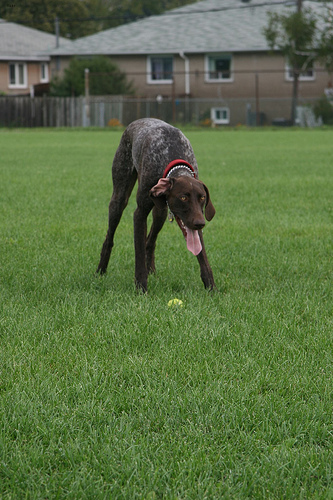
Reveal the failure and compare both models
The pixel model detects none of the 54 classified pet pixels. It still gets 1,391 of 1,445 classified pixels correct: 96.3% accuracy and 0% pet IoU. Another 91 unclassified pixels are excluded. An always-background baseline gets the same accuracy. Convolution also misses all pet pixels and adds false positives.
| Source photograph | Pixel model | Convolution |
|---|---|---|
| White dog, samoyed_36 | 53.4% | 79.5% |
| Distant dog, german_shorthaired_3 | 0% | 0% |
| Gray cat, British_Shorthair_64 | 0% | 5.9% |
Only the convolutional model's white-dog result clears 70%. Neither model meets the frozen requirement on every source. Do not replace that gate with a favorable average after seeing the results. Equal training updates were not equal compute.
Inspect the other originals and row-major predicted masks in the pack. Propose one intervention and say which failure it targets. Test it using development data; this exposed cohort cannot become a new untouched evaluation.
These are three convenience photographs with distinct IDs and bytes, not proof of distinct animals, photographers or population independence. Source/annotation review and independent learner implementation review remain pending. The official dataset page and included attribution describe the source and license. Numerical replay verifies predictions, not learning effectiveness or deployment readiness.
6. Continue with the perception project
Return to saved perception experiments and reports or try its three separate objective transfer cases. Optional studio work does not change required completion percentages or browser progress.